


- Published on: 2026-11-10 09:08:36
How to Read Trade Execution Slips and Understand Your Fill

A trade execution confirmation shows what happened to your order: the asset bought or sold, the quantity filled, the execution price, and the trade date. To learn how to read trade execution confirmation slips, look beyond the headline price: check whether the order was fully filled, what charges applied, and how the fill compared with the price you expected.
The execution price is only part of the story. Prices can move between order submission and execution, so a fill may reflect slippage or price improvement. Routing and fees provide further context. Use the confirmation to compare the recorded trade with your order details and account activity.
This guide explains where confirmations usually appear in a brokerage account and how to review fill prices, partial fills, slippage, price improvement, routing information, and fees. You’ll also learn how to spot discrepancies and what to document when a confirmation doesn’t match the trade you intended.
Key Takeaways
- Use the execution price, quantity, and timestamp together to understand what your order actually filled, including any partial execution.
- Compare the fill with the market conditions and order type to distinguish slippage from price improvement.
- Find individual trade records in your account’s documents or transaction history, and use statements as a broader activity summary.
- Review routing details and disclosed charges alongside the fill, then document any mismatch or unauthorized activity promptly.
- For US equities, settlement has followed a T+1 cycle since May 2024, according to the U.S. Securities and Exchange Commission.
Execution quality, slippage, and price improvement
Execution quality compares your fill with the available market price and your order’s terms. A confirmation lets you review the price, quantity, timing, and resulting amount due.
Compare Execution and Market Prices
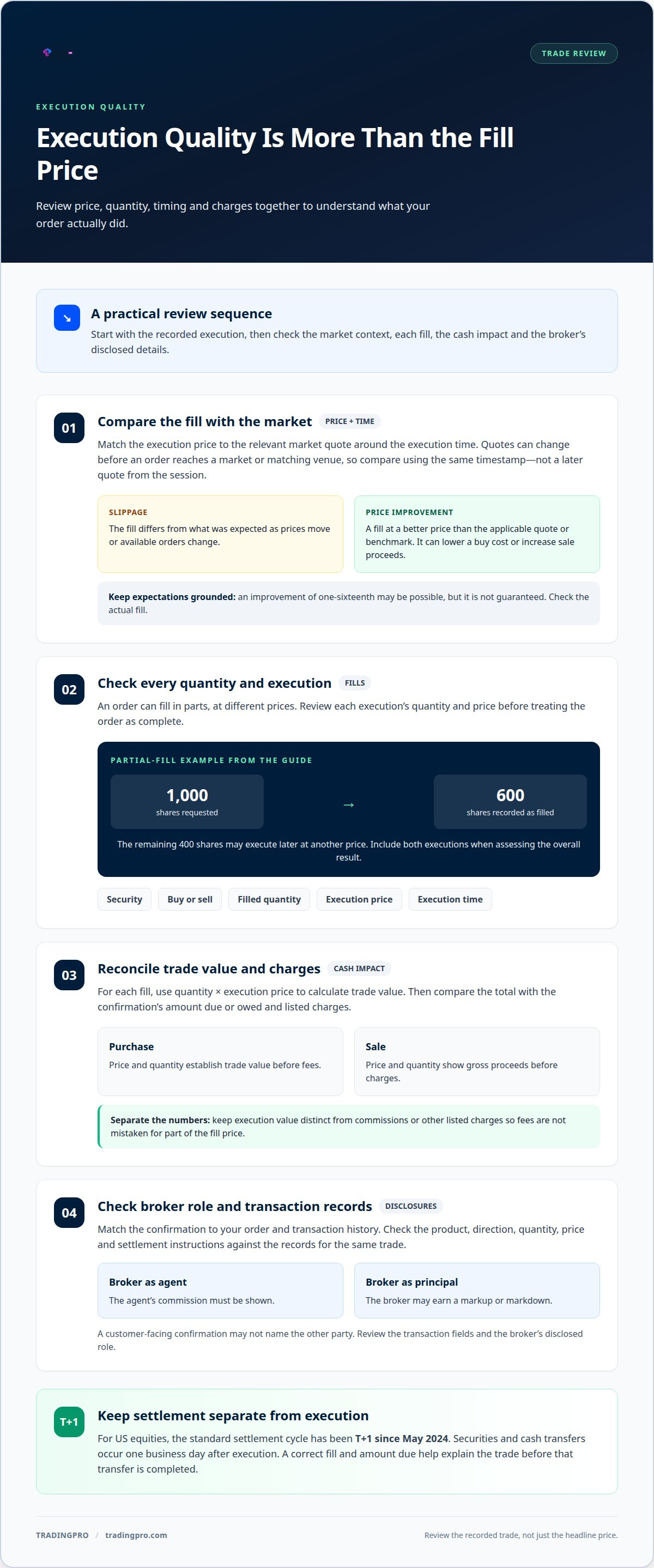
The execution price is the price at which all or part of your order was filled. Compare it with the quoted market price around the execution time to see whether the fill was better or worse than expected. Timing matters: a quote can change before the order reaches a market or matching venue.
The difference is slippage, which can occur when prices move quickly or available orders change. Compare prices using the same timestamp and relevant market quote, not a quote from later in the trading session.
Price improvement means a fill at a better price than the applicable quote or benchmark. It can lower the cost of a buy order or increase the proceeds from a sell order. An improvement of one-sixteenth may be possible, but it is an opportunity, not a guaranteed outcome. Review the actual fill rather than assuming an improvement.
Check Trade Prices and Quantities
Checking price and quantity means matching each filled amount against the order you placed. An order may fill in parts at different prices instead of completing in one transaction. A confirmation may list multiple executions, so review each fill and its quantity before assessing the overall result.
For example, if an order requests 1,000 shares but the confirmation records 600 shares, only that quantity has filled so far. If the remaining 400 shares later execute at another price, calculate the average fill using the prices and quantities of both executions. Don’t treat the first fill as the final order result.
Compare the security, buy-or-sell direction, filled quantity, price, and execution time with your order details. Even a sell order for the correct asset can produce an unexpected result if the filled quantity or price differs from the intended terms. Review each partial fill separately.
Check Execution Prices and Amounts Due
The amount due reflects the filled quantity multiplied by its execution price, adjusted for applicable charges. Reviewing this calculation matters because the quoted price alone doesn’t show the full cash impact. For a purchase, price and quantity establish the trade value before fees; for a sale, the same calculation shows gross proceeds.
Use the listed fills to calculate the trade value, then compare it with the displayed total and charges. Separate the execution cost from any listed charges so that fees aren’t mistaken for part of the fill price.
Settlement is separate from execution. According to the U.S. Securities and Exchange Commission, the standard settlement cycle for US equities has been T+1 since May 2024, meaning securities and cash transfers occur one business day after execution. A correct fill price and amount due help you understand the trade before that transfer is completed.
What is a trade confirmation slip?
A trade confirmation slip is the broker’s record of a completed buy or sell transaction. It connects an order to its resulting trade and provides details for account records, tax calculations, and resolving questions about an execution. A practical guide to how to read trade execution confirmation slips starts by identifying which transaction the document describes.
For options, bonds, mutual funds, and ETFs, match the product description and transaction side to the investment. Bond confirmations may include yield and accrued interest. These product-specific fields add context to the basic details found across trade records.
Read Confirmation Trade Details
Trade details identify the product, execution price, filled quantity, and transaction timing. Read the security description alongside the trade date and timestamp, if shown, to link the record to a specific position change. The confirmation may also show the total amount due or owed and transaction charges.
Check whether the trade was a purchase or sale, then note how it affects your position. A purchase adds to a holding; a sale reduces or closes it. Keep the commission separate from the execution value so the record clearly distinguishes the trade from its charges.
Compare Details With Orders and Broker Records
Compare the confirmation with your order and broker records to check that they describe the same requested transaction. This can reveal differences in the product, direction, quantity, or execution details. For example, a confirmation showing a purchase should not match an order you entered to sell.
Review the matching transaction in the broker’s history, not just the account’s overall position. If an order filled through several executions, each entry may show a different quantity or price. Comparing those entries with the original order clarifies how the final position was formed.
Check Counterparty Trade Details
Counterparty checks compare the trade information recorded by each side during confirmation and affirmation. Matching the product, direction, quantity, price, and settlement instructions can reveal inconsistent records before they affect later processing.
The confirmation may indicate whether the broker acted as agent or principal. An agent’s commission must be shown; a principal may earn a markup or markdown. A customer-facing slip may not name the other party, so focus on the transaction fields and the broker’s disclosed role.
Read Confirmations Across Investment Types
Reviewing confirmations across investment types means using the shared trade fields while accounting for product-specific information. This matters because an option contract or bond has details that a basic share record doesn’t capture.
For options, match the contract description and transaction side to your order. For bonds, read yield and accrued interest alongside the security and price. For mutual funds and ETFs, identify the fund, transaction direction, quantity, and recorded price. These checks make reading trade execution confirmation slips a repeatable process across different holdings.
Finding confirmations in brokerage accounts
Brokerages usually keep trade confirmations in your account, electronically or on paper. Start with the documents area, transaction history, or monthly statements, then open the record for the individual trade.
Locate the Individual Trade Record
Find the confirmation tied to the transaction date and security rather than relying only on an account summary. Brokerages often send confirmations within one business day after execution, and the record may also appear in the platform’s documents or activity view.
A confirmation documents an individual trade; a statement summarizes holdings and activity over a period. If a statement shows a position change, for example, open the matching transaction record to see the execution details. Keep both records: the confirmation explains one trade, while the statement gives a broader account view.
Understand Best-Execution Responsibilities
Best execution refers to a broker’s responsibility to seek favorable execution for a customer’s order. Price matters, but the process can also involve speed, available liquidity, and the likelihood of completing the order. A platform may route an order directly to a market, match it internally, or send it through another firm.
According to the U.S. Securities and Exchange Commission, brokers report execution quality on a stock-by-stock basis and notify customers whose orders weren’t routed for best execution. This information can help explain how an order was handled, but it doesn’t replace the confirmation for your specific transaction.
Review Routing and Execution Reports
Routing information describes where an order went for execution. Rule 605 and Rule 606 disclosures provide information about execution quality statistics and order-routing destinations. Use these reports as context for a platform’s execution practices, then compare them with the specific fill shown in your confirmation.
A report describes routing or execution patterns; it doesn’t establish the details of an individual trade. A stock-level report, for instance, can provide broader execution-quality data, while your confirmation records the actual price and quantity filled. Keep these roles distinct when reviewing a result.
Keep the Confirmation With Your Records
Save each confirmation with the related order details and account statement. This gives you a practical record for reviewing transactions, tracking position changes, and spotting differences across documents. A note of the order’s intended terms can also clarify what you expected the broker to execute.
Use the confirmation as the starting point when the platform shows unfamiliar routing information or an unexpected fill. Match the transaction date and security across the confirmation and statement, then review any available Rule 605 or Rule 606 material for wider context. This keeps the individual execution separate from general platform reporting.
Order validation, routing, matching, and fill confirmation
An order passes through validation, routing, matching, and confirmation before its execution appears in your records. Each stage can affect whether the requested quantity fills, where it fills, and at what price.
First, the broker or platform checks the order details, including the security, direction, quantity, and order type. It then routes the order to an exchange, another market venue, or an internal matching process. Available liquidity matters: a venue needs willing buyers or sellers at the relevant price to match orders. A large order may therefore fill in parts or at multiple prices.
Your order type sets the conditions for execution:
- Market order: seeks execution at the best available prices. An order for 100 shares of a stock quoted at $50 may fill at different prices as the market moves.
- Limit order: executes only at the limit price or better, if the market reaches it. A buy limit at $50 requires the stock to reach $50 or below; execution isn’t assured.
- Stop order: becomes active when the specified stop price is reached. Traders often use it to limit losses or protect profits.
- Stop-limit order: becomes a limit order after reaching its stop. A sell order with a $50 stop and $48 limit becomes a limit order at $48 or better.
Routing determines where an order can meet another order. A broker may send it directly to an exchange, route it through another firm, or match it internally. Dark pools are private venues designed to help institutional investors execute large orders without disclosing their quantity. The venue and available orders shape the actual fill, not just the price displayed when you submitted the order.
Liquidity and order-book queues affect the likelihood of a fill and the potential market impact. When orders compete at the same price, queue position can affect which one matches first. The fill rate indicates whether the entire order completes or only part of it. Splitting a large order can reduce its visibility and potential market impact, while seeking a better limit price can reduce the speed or likelihood of execution.
Read the confirmation as the record of matched executions, not merely the original instruction. For each fill, connect the order’s direction and quantity to its execution price and time. If a 100-share order fills in separate portions, the confirmation may show those executions individually. The resulting transaction then proceeds toward settlement under the applicable market cycle.
Reviewing fees and reporting discrepancies
A confirmation records more than the buy or sell price. Review its charges, transaction status, and trade details against your order and account statement. A clear document trail makes discrepancies easier to describe and supports later tax calculations.
Start with the fees. Compare each commission and other charge with the terms in your brokerage agreement. If the broker acted as an agent, the confirmation must show any commission charged. If it acted as principal, a markup or markdown may apply. For covered retail bond transactions, a same-day principal trade with a third party generally requires a separate markup or markdown disclosure, shown as a dollar amount and a percentage of prevailing market price.
Check whether the transaction is labeled solicited or unsolicited. If an investment professional suggested a trade but the confirmation calls it unsolicited, note the mismatch. Review handling fees and mailing charges, too. An unexpected charge or unclear description gives you a specific issue to raise with the brokerage.
If you find an error, save the confirmation, related order details, and account statement. Note the security, trade date, quantity, price, and exact discrepancy. Report the issue to the broker promptly and in writing; do the same for any trade you didn’t authorize. Keep copies of your message and any response with the transaction record. These details help establish what was recorded and support the resolution of a trade-related dispute.
Use confirmations as supporting records when calculating capital gains or losses. Together, they can help establish the transaction information used in your calculations. Cross-reference them with the brokerage statement for the period, and retain them with your other tax documents. A confirmation supports your records, but doesn’t replace complete tax reporting.
For execution quality, distinguish a report about a broker’s practices from the confirmation for your individual trade. The U.S. Securities and Exchange Commission requires execution-quality reporting on a stock-by-stock basis and customer notification when orders weren’t routed for best execution. Rule 605 and Rule 606 disclosures provide broader context on execution statistics and routing destinations. They don’t replace the fill details recorded on your slip.
When you find an issue, identify the exact field rather than simply describing the trade as “wrong.” For example, say that the confirmation shows a different quantity from your order, or identify a charge that doesn’t match your agreement. Attach the relevant records, state what you want reviewed, and keep a dated copy. This makes the discrepancy easier to track as the brokerage responds.
Build a sharper trading routine around accurate records and deliberate decisions. Open a TradingPRO account to get started.
TradingPRO
TradingPRO offers account options for different trading approaches. After learning to review execution slips, apply that discipline to your own trading: understand your order, then use the confirmation to examine the recorded fill and charges.
Choose among the Rookie Account, Micro Account, Pro Account, and Scalp Account based on the option that fits your approach. Keep the focus on informed decisions, clear order records, and reviewing each transaction against the terms you intended.
For a next step, contact TradingPRO by starting your registration.
Make Each Trade Review Count
Use each confirmation as a practical feedback point for your trading process. A consistent review routine can help you notice patterns in how your order choices, timing, and execution decisions affect your records. Those observations can guide more deliberate decisions before your next trade.
Knowing how to read trade execution confirmation slips is part of a disciplined approach, but the next step is applying what you learn to your trading goals. Set a clear purpose for each order, keep your records organized, and use them to make informed choices.
If you’re ready to take that next step, contact TradingPRO and get started. Build your confidence through deliberate decisions, one trade at a time.
Frequently Asked Questions
What Is an Execution?
An execution occurs when a buy or sell order is matched and a trade is completed. If you place an order for a stock, the execution record shows the resulting transaction, including its filled quantity and price. An order that remains open or is canceled hasn’t executed for its unfilled portion. Separate executions may appear if an order fills in stages.
What is the difference between execution and settlement?
Execution is the completed trade; settlement is the later transfer of the securities and cash involved. A stock purchase, for example, can be executed before the shares and payment transfer between the relevant accounts. The trade confirmation documents the transaction, while settlement completes the associated transfers. Keep the dates distinct when matching the trade record with account activity.
What is trade execution in simple terms?
Trade execution is when an order finds a matching buyer or seller and a trade takes place. If you enter an order to buy shares, for example, the trade can be filled once a seller’s offer matches its terms. The execution may cover the whole order or only part of it. The resulting record describes what actually traded, not just what you requested.
Who is involved in the confirmation process?
The investor places the order, and the broker or trading platform handles and records it. A market venue or another firm may help route and match the order. After execution, the broker provides the customer’s confirmation. In institutional workflows, operations teams can compare booked trade details with the broker’s version and flag mismatches. The customer-facing confirmation may not identify the specific counterparty.
Why is it Important?
A confirmation gives you a transaction record for checking account activity, maintaining financial records, and addressing trade-related disputes. It can also support capital gains or losses calculations when you sell an investment. For example, a purchase record can help document acquisition details later. Keeping confirmations alongside account statements makes it easier to trace position changes to specific trades.
What information appears on a trade execution confirmation slip?
A confirmation can identify the security or product, whether the transaction was a purchase or sale, the quantity, execution price, trade date, and settlement date. It may also show the execution time, total amount due or owed, and applicable commission or charges. Bond confirmations can include yield and accrued interest. Review product-specific fields as well as the basic trade details to understand the full transaction record.
How to read the trade date, settlement date, and execution time on a trade confirmation?
The trade date identifies when the transaction was executed; the settlement date identifies when the related cash and securities transfers are due. The execution time, when provided, records when the fill occurred. Use these fields together to distinguish the trade from its later completion. If an order filled in several parts, separate timestamps can help connect each fill with the relevant activity.
How to interpret quantity, price, and order type on a stock trade confirmation?
Quantity is the number of shares filled, and price is the amount per share for that execution. The order type explains the instruction governing the trade: a market order seeks the best available price, while a limit order sets a price boundary. Compare the filled shares with the order quantity, then check whether the recorded price fits the order’s terms. Partial fills may appear separately.


